U.S. Bank Mobile Banking
Information
-
DeveloperU.S. Bank Mobile
-
Package Namecom.usbank.mobilebanking
-
CategoryFinance
-
App NameU.S. Bank Mobile Banking
-
Version3.77.65
-
Rating4.7
ADVERTISEMENT
Origins of U.S. Bank Mobile Banking
The U.S. Bank Mobile Banking app was developed as part of U.S. Bank's commitment to providing customers with comprehensive and convenient financial management tools directly from their mobile devices. Recognized as a leader in digital banking, U.S. Bank launched this app to enhance the seamless and secure handling of personal banking needs, allowing users to manage finances while on the go.
Available for Android and iOS devices, the U.S. Bank Mobile Banking apk offers a free and user-friendly experience, ensuring that both tech-savvy and new users can effortlessly download and install the app. By giving access to an extensive range of financial services within the palm of their hands, the U.S. Bank Mobile Banking app continues to accommodate the evolving needs of the modern banking customer.
U.S. Bank Mobile Banking Features
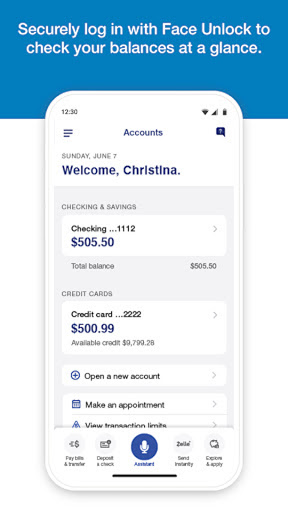
1. **Security at Your Fingertips**: The U.S. Bank Mobile Banking app prioritizes user security with dual verification methods. Users can log in using their existing credentials from usbank.com or enroll directly through the app if they lack online access. Moreover, the app sends alerts for duplicate charges, signs of suspicious activity, and low balances, thereby ensuring that security measures are proactive and reliable.
2. **Efficient Account and Card Management**: The app effectively consolidates diverse financial information. Users can view various accounts, such as checking, savings, credit cards, and loans, in a single view. It also allows secure credit score access, card management with options to lock or unlock, and even the addition of cards to a mobile wallet, ensuring convenience and ease of mind in financial management.
3. **Personalized Insights**: By analyzing spending habits, the U.S. Bank Mobile Banking app offers monthly spending reviews in key categories like Food & Dining. Users receive customized money-saving and growth recommendations tailored to their financial behavior, empowering them to make informed financial decisions and improve their financial health over time.
4. **U.S. Bank Smart Assistant®**: This feature turns the U.S. Bank Mobile Banking app into a digital assistant capable of handling multiple banking queries and tasks. Users can ask questions like "What’s the routing number for my checking account?" or command actions such as "Transfer $50 from checking to savings," granting enhanced control and efficiency in managing accounts.
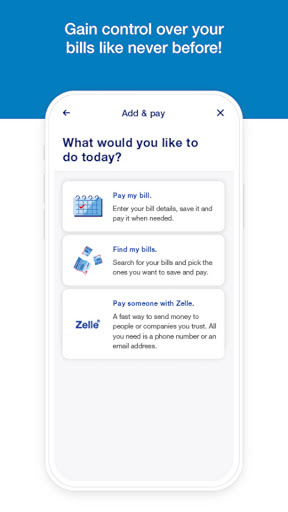
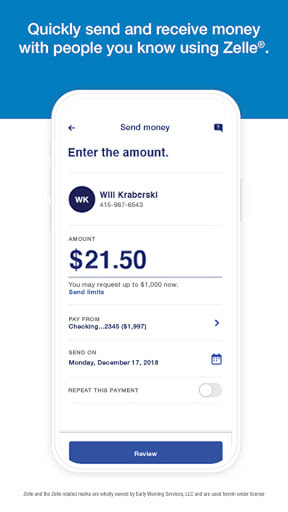
5. **Easy Money Movement**: The app supports seamless financial transactions, allowing users to send and request money through Zelle® to friends and family. It also includes features like quick check deposit with increased limit capabilities, unified bill payment management, and internal transfers between U.S. Bank accounts, underlining swift financial operations.
How to Use U.S. Bank Mobile Banking
1. **Download and Install**: To begin, Android users can download the U.S. Bank Mobile Banking apk from the Google Play Store, whereas iOS users can find it on the App Store. After download, users can proceed with the installation to start utilizing the app's features. It is free to download, making it accessible to everyone who wishes to install the U.S. Bank Mobile Banking app on their devices.
2. **Create or Log into Your Account**: After installation, new users should enroll for online access directly through the app. Existing users can log in with their online banking credentials. This setup ensures a smooth transition for current U.S. Bank customers while offering an easy onboarding process for newcomers.
3. **Set Up Security Features**: Once logged in, activate the security alerts and notifications to stay informed about account activities. This step is crucial in safeguarding your financial wellbeing while using mobile banking services.
4. **Explore the Dashboard**: Familiarize yourself with the app's interface by exploring its main dashboard, where you can view account balances and recent transactions. Users can also review credit scores, monitor monthly spending, and track their financial activities over time.
5. **Utilize Money Management Tools**: Take advantage of various tools provided by the app. Use travel notifications, card lock/unlock features, and expense tracking to remain on top of your financial health and efficiently manage different aspects of your accounts.
Hidden Tips
1. **Optimize Notifications for Enhanced Security**: While using the U.S. Bank Mobile Banking app, customizing notification settings can be invaluable. Ensure notifications for duplicate charges, suspicious activity, and low balances are enabled to maximize your account security and promptly reduce risks.
2. **Leverage Smart Assistant for Easier Banking**: Employ the U.S. Bank Smart Assistant® for a hands-free experience. Use voice commands to manage simple financial tasks and queries, turning general banking actions into less time-consuming activities.
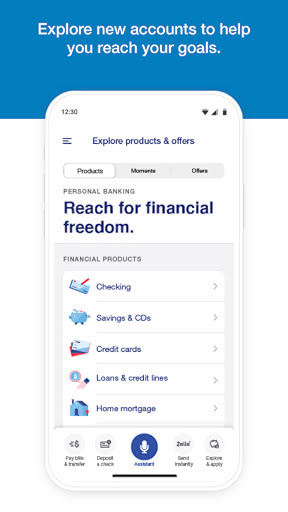
3. **Explore Reward Programs and Offers**: Delve into product offerings directly within the app, such as new accounts, credit cards, and loans, to discover how you can benefit from special promotions, rewards, and interest rates catered to your account profile.
4. **Utilize Travel Notifications**: Before traveling, set up travel notifications to avoid any disruptions in your card usage due to potential fraud alerts. This ensures continuous access to funds and secure banking while away from home.
5. **Access Real-Time Support**: If challenges arise while using the app, explore the Help Center or use real-time support services like Cobrowse for immediate assistance. Scheduling a banker appointment can also provide clearer insights and solutions tailored to your specific banking needs.
Overall, the U.S. Bank Mobile Banking app stands out for its comprehensive feature set, ease of use, and strong emphasis on user security and satisfaction. By allowing customers to access a wide range of banking features at their fingertips, it cultivates a user-friendly platform that meets modern banking expectations. Regardless of whether a customer is seasoned in using digital tools or relatively new to mobile banking, the app's intuitive design and supportive features ensure an optimal banking experience. For those seeking an all-encompassing financial management assistant, downloading and installing the U.S. Bank Mobile Banking apk could serve as a significant step towards smooth and efficient daily financial management.
ADVERTISEMENT